Git设置代理(v2rayN)

Mzaxd lol

为什么设置代理?

在使用Git操作远程库(Github)的时候偶尔会失败,通常都是网络的问题(众所周知的原因),通过使用代理可以有效避免这个问题

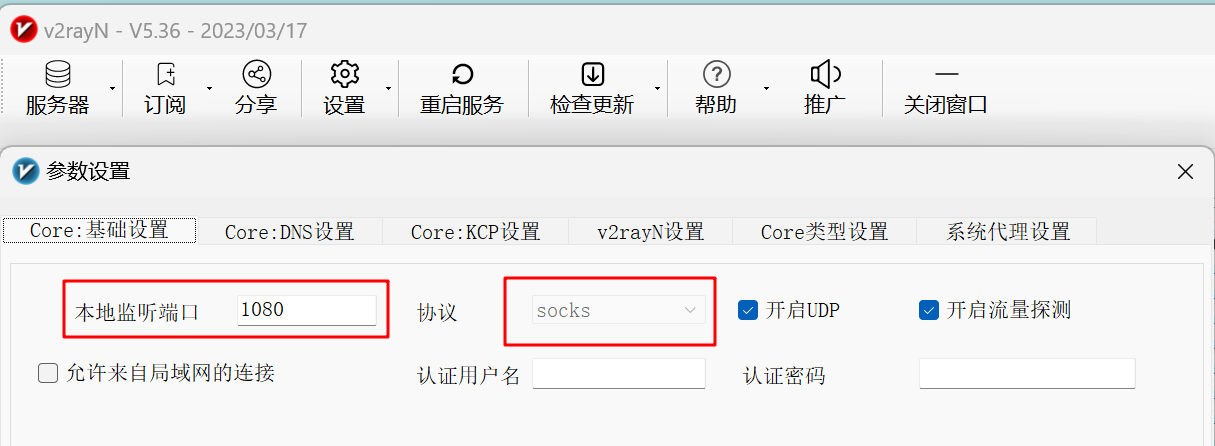
查看代理本地监听的端口号

  1. 打开v2rayN的管理面板
  2. 点击设置,选择参数设置
  3. 在弹出的参数设置页面找到下图中的本地监听端口协议
  4. 根据你的端口号和协议进行对应设置

image-20230318143459628

设置Http代理

1
2
3
# http协议,1081端口修改成自己的本地代理端口
git config --global http.proxy http://127.0.0.1:1081
git config --global https.proxy https://127.0.0.1:1081

设置socks代理

1
2
3
# socks5协议,1080端口修改成自己的本地代理端口
git config --global http.proxy socks5://127.0.0.1:1080
git config --global https.proxy socks5://127.0.0.1:1080

只给Github加代理

上面的代理配置是让所有Git命令都走代理,但是如果你使用国内的Gitee或者自建的GitLab,那么使用代理只会让访问变慢。

1
2
3
4
5
6
7
# socks5协议,1080端口修改成自己的本地代理端口
git config --global http.https://github.com.proxy socks5://127.0.0.1:1080
git config --global https.https://github.com.proxy socks5://127.0.0.1:1080

# http协议,1081端口修改成自己的本地代理端口
git config --global http.https://github.com.proxy http://127.0.0.1:1081
git config --global https.https://github.com.proxy http://127.0.0.1:1081

取消代理设置

1
2
git config --global --unset http.proxy
git config --global --unset https.proxy
  • 本文标题:Git设置代理(v2rayN)
  • 本文作者:Mzaxd
  • 创建时间:2024-04-03 15:12:59
  • 本文链接:https://mzaxd.github.io/2024/04/03/Git设置代理(v2rayN)/
  • 版权声明:本博客所有文章除特别声明外,均采用 BY-NC-SA 许可协议。转载请注明出处!
 评论